


Available optional subjects and their syllabi can be found in SIS.
On this page:
Registration periods 2026/2027
- Winter semester: 16—30 September 2026 (from 6:00 p.m.)
- Summer semester: 2—15 February 2027 (from 6:00 p.m.)
Find available optional subjects
- Open SIS (no login required).
- Select Subjects.
- Check the correct academic year.
- Select View by Plans.
- Choose your faculty, Branch/plan, and year class
The list displays compulsory subjects first, followed by optional subjects.
How to register an optional subject
Step 1
Log in to SIS and open [Subjects and Schedule Registration].

Step 2
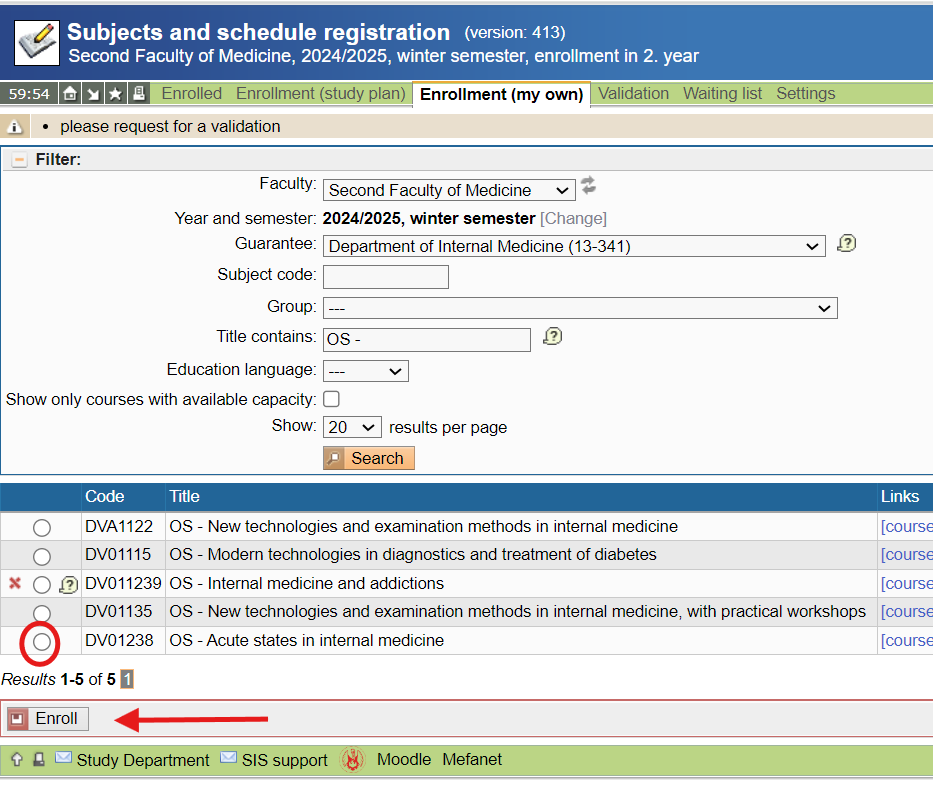
Select the correct academic year and open Enrollment (my own). (Beware that you will not see the Second Faculty of Medicine sign until you are allowed to register the optional subject);
Step 3
Search for the optional subject by department (Guarantee), course code, and course title.
Tip: Enter "OS -" in the Title contains field to display all optional subjects.
Step 4
Select the desired subject and click Enroll.
Step 5
Choose a timetable group from the available options.
The selected class will automatically appear in your SIS timetable.


